I think i'd said this before. i love ADOBE PHOTOSHOP CS3! Thanks the people who invented it. It's so much fun that you can do alot of wonders with it =D.
Here are my old manipulation photos i did using photoshop.
using materials i found on the internet..

to create virtual tattoo manipulation.

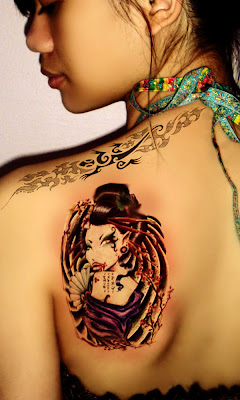
 another manipulation. (right-click photo to view larger image in a new link)
.jpg) .self-tortured.
.self-tortured. scary i know (-.-")
the world has been photoshopped.I just bought a new make up set and tested it on my lil sister, I was planning to post it up the result but then: 1) my camera's LCD screen cracked and 2) the makeup result didn't get much to my satisfactory because i have limited brushes to start with. I'm planning to buy brushes set so i can try out my make up set again =D.
Now back to the main reason of this post. I usually i did photoshop with my own photos, but i wanna made changes and try someone else's :p. I hope she doesn't kill me when she sees this O=).
And my model is..
my cousin Gymah =D

This editorial for this post is
virtual makeover using photoshop CS3.
Putting up makeups could be troublesome, it takes time to put it on and ESPECIALLY to wipe it off. I so hate doing the makeup removing part. And i tend to sleep with my make up on >.>. But i have to get rid of that bad habit since my skin is acne prone and it takes time to heal. So when it did happen, my aid are my mineral foundation & concealer to camouflage the blemishes. but huge zits are still harder to hide. pffttt.
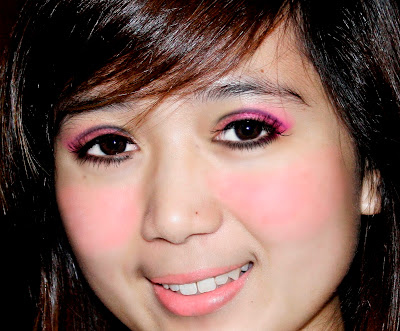
When i starts with her photo, she has no makeup. My main point is to show how i do virtual eyeshadows, adding fake eyelashes, blusher and lipstick to her nude skin.
theme: "Barbie color makeups"
Not really a detailed editorial, just the screen shots.
1) smoothing skin using healing brush & box blur
2) creating eyeliner using brush & color swatches
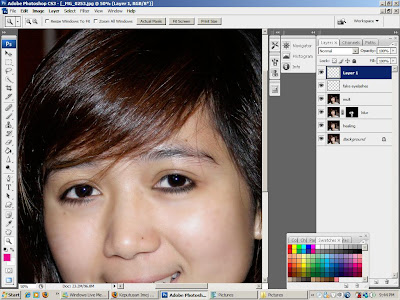
3) adding eyeshadow by creating new layer & downloaded eyeshadow brush
4) adding fake eyelashes using brushes

5) blusher and matching lipstick
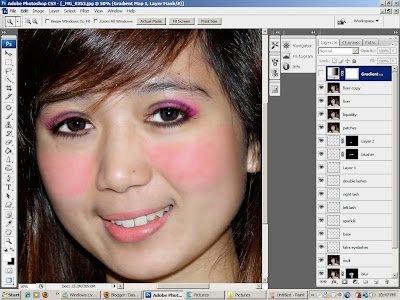
and result..
smoothen out the colors by changing mode to soft light with adjusted opacity.
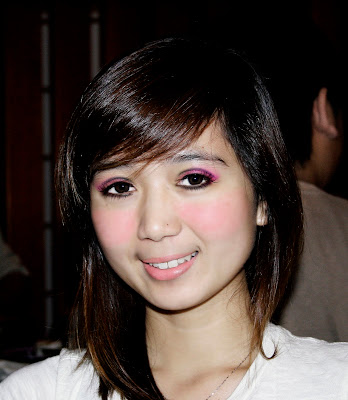
and the zoom-in version to get a good look of the eyeshadows & fake eyelashes =)
Okay i'm done. i'm gonna head to bed now. good night.
p.s: minta ampun minta maaf cousin ku tersayang tidak meminta kebenaran. lawaaa jua =D. despite this, i know you love me bebeh ;).
xoxo.


.jpg)
 So that's it.
 So that's it.

.jpg)


